Showing posts with label Reviews. Show all posts

Thursday, June 6, 2024

Folding charger is great for travel

I've spent several years searching for a travel charging station that would let me get rid of all the cables that clutter my travel backpack. This may be the right one.

The Gowatt Snap Charger Optimal is designed to charge an iPhone, an Apple Watch and an Airpod wireless case all at the same time. 

In its traveling mode, the charger is about the same size as my iPhone 15: about 6 inches long, 3 inches wide and less than 1 inch thick. It unfolds to reveal a Magsafe holder, a pop-out shelf for the Apple Watch and a disk for charging the Airpods case (or perhaps a second phone). 

In addition to the convenient size, I like how the Magsafe panel has a strong magnet that holds my phone in vertical or horizontal mode. The horizontal is especially good for video calling, video watching or nighttime use when the phone turns into a clock.

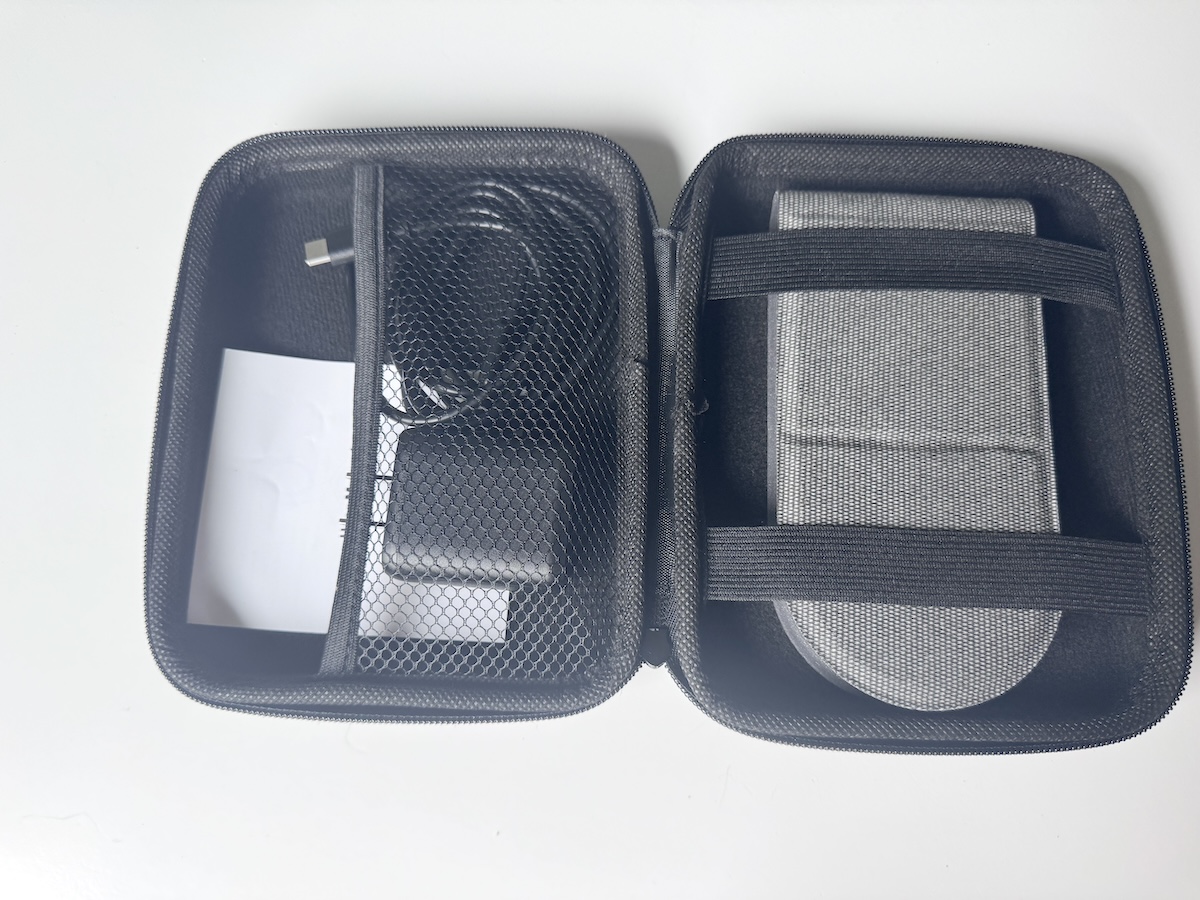
The stand comes with a USB-C to USB-C cable, an adapter and nice-looking zipper carrying case. The system delivers 15 watts of charging power. That may not be enough for fast charging but quite sufficient for overnight use.


Tuesday, March 26, 2024

Gooseneck tripod is good for product photos

When I post something for sale online, I like to include a few nicely-staged photos. Often the best angles for those pics are ones that are shot directly overhead, and they can be difficult to do. I have to lean out over a table or counter top while trying to see the image on my phone screen without casting a shadow or moving the phone when I click the shutter.

A few months ago, I got a phone camera mount that clamps onto the edge of a table. The concept was okay but the materials were flimsy, like the cheap desk lamp that I had back in the 80s. 

This gooseneck mount on a tripod is far more stable and useful. The tripod's long legs sit flat on the floor and provide a good counterweight anchor for the clamp at the end of the extended gooseneck, whether it's holding a standard pocket phone or a 12.9-inch iPad. The tripod tubing is made of sturdy metal and can be extended from 18 inches all the way to 80 inches.

The clamp at the end of the gooseneck is adjusted using a threaded thumbscrew, which I think makes for a more solid grasp than a spring-loaded clamp. If you disagree, you can replace the clamp with your own. The kit also comes with a remote shutter release that will work with iOS or Android devices. That should help me get clean and clear photos.

There are other ways you can adapt this tripod for different uses. For example, the product comes with a ball head so you can get a more precise angle for your photo. There's also a screw post where the gooseneck connects to the tripod. Remove the neck and you can mount a heavier object. I tried it first with a two-pound floodlight, then with a three-pound SLR camera.

Overall, I was very please with the quality and versatility of this device. I plan to give it lots of jobs.  

Tuesday, March 12, 2024

A photo backdrop for small items

Although this backdrop kit is promoted as something to capture food images, I thought it would be useful for the videos and still images that I create for many small products that I sell online. 

The metal frame was fairly easy to assemble. There are five metal bars are attached to each other using a provided allen wrench for the uprights and thumb screws for horizontal bar. 

The paper background sheets presented a bit more of a challenge. The sheets arrive wrapped tightly around a cardboard tube and sealed in plastic wrap. Once the wrap is removed, the sheets are not inclined to flatten without help. 

I tried putting a sheet color-side down and pulling it across a table's edge. Not a good idea. The sheets are very thick and the table edge left some scratches. A better approach is to re-roll a single sheet around the cardboard tube, then let leave it on a flat surface while it attempts to flatten itself. 

I appreciate the deep and rich colors of the sheets and the variety of colors. They really add some visual pop to product photos. And I like the fact that the frame and sheets can be easily transported to shoot items on location.

I only wish the LDMJNL frame was a few inches wider. The backdrop worked fine for a small object, like a pair of earbuds, but I couldn't find an angle that let me capture a decorative bowl without running out of backdrop at the edges.

Nevertheless, I expect I will get a lot of use out of this 


Friday, March 8, 2024

Another cable disappointment

I've tried several of these three-headed charging cables, all with mixed results. One didn't have enough power to charge my iPad while another was only about two feet long, meaning I often had to charge my gear on the floor to be close to a wall outlet.

I had high hopes for his one. The OXO cable is about six feet long, so I would be able to use it almost anywhere. And this package included a power block with three outlets, one USB-A and two USB-C, one rated for 20 watts, the other for 65 watts.  

This seemed perfect for my gear: an iPhone 15, an Apple Watch and either my full-sized iPad or my iPad Mini. What could go wrong? I soon found out.

This OXO cable is apparently not suited to charge all three devices at the same time. I could charge phone and watch or tablet and watch. But if I had phone and tablet connected atthe same time, the tablet's charging icon turned white and displayed the dreaded "Not Charging" message.

The result was the same whether I used the 20- or 65-watt connections, same for different wall outlets and same for both the big iPad or the Mini. 

Once again, my heart is broken but I suppose it's my fault for assuming that OXO's Lightning plug would charge my tablets. A closer read of the description on the OXO sales page describes "one charger compatible with iPhone, Watch, and AirPods." Nowhere does it mention iPads.


Wednesday, February 28, 2024

A multi-function camping lantern


This LED camping lantern is sort of a Swiss Army knife for outdoor illumination. It tries to do several different jobs and generally succeeds on all counts. 

It can be straight-ahead flashlight with a button that cycles through three lighting levels. Long press the button and you get a red flashing emergency light. For wider illumination, there's a second button that also provides three light levels. You can set the light on a flat surface or hang it overhead using a loop that pops out of top of the lamp. 

That top cylinder also rotates to reveal a reading lamp, again with three brightness options. And it can charge a mobile phone or other device by plugging in a USB cable. 

The camping lantern itself has its own battery that can be recharged with a USB-C cable and you can install AAA batteries to power the flashlight/reading lamp as a back-up to the internal 4000mAh battery. That's the kind of versatility that I would want for an emergency light in my car, at home during a power failure or for any sort of expedition into the woods after dark.

There are only a couple of things that bother me about this light. One is the handle that users attach by installing a pair of thin wire loops. I would prefer a solid handle built into the lamp's housing. Also, the rotating reading light doesn't make a very secure connection to the top of the lantern housing. It feels like it could easily break, especially if a user twists it in the wrong direction. The lamp has a warning sticker that tells you not to do that, but this product is made to be used in the dark where it's not easy to read.


Monday, January 29, 2024

Cable offers 3-in-1 convenience

I've tried a couple of these multi-headed charging cables in the past and none of them performed very well. The typical issue is they don't have enough capacity to charge three devices at once. 

The Cugunu charging cable seems to be capable of doing the job. It three connectors with tips for USB-C and Lightning plus a disc to charge the Apple Watch. That's what I needed for my iPhone 15, my iPad and watch. All three lit up and promptly began refueling.

The business end of the cable offers a nice touch of convenience. The full-sized USB-A slides up to reveal a USB-C plug so it can be used with either an A or C outlet.

The center part of the cable is coiled like those old-time wall phone cables and I'm not sure why that was done. In its coiled state, the cable is too short to connect to an AC outlet that's more than two feet away - like one at floor level, the most common location. Stretch the cable out to three feet and it will try to collapse like a spring, pulling your gadgets along with it. 

Whatever the idea was behind the coil, this cable does what I wanted it to do: eliminate the need to pack several cables and charging blocks in my travel bag. 


Tuesday, January 2, 2024

Mini power bank has a spot for Apple Watch

Over the years I've collected several charging cables and devices that were designed for travel convenience. Most of them served me well enough, but that was before I acquired an iPhone 15 with its new USB-C charging port.    

The RORRY Mini Portable Charger looked like a good option to replace my chargers and their Lightning connection. In addition to its pop-out USB-C plug, this charger has two features that caught my attention. 

First, it doubles as power bank. It has a 5000mAh 15-watt battery pack that can refuel my phone without having to connect to an AC outlet. That feature was quite handy when I stayed for a couple of nights in a room where outlets were either already taken or well hidden.

Second, it will recharge my Apple Watch at the same time it charges my phone. The charger is advertised to deliver one full charge to an iPhone 8 times to a watch. My phone wasn't fully drained, so I got two overnight charges for both phone and watch.

That was enough for the RORRY charger to earn a permanent spot in my travel backpack.


Wednesday, December 27, 2023

Good watchbands, great price

If imitation really is the sincerest form of flattery, then the people who made these bands are clearly making goo-goo eyes at Apple. 

The bands in this five-pack look almost exactly like two of Apple newest styles. Three of them feature a G-hook and nylon loops, just like Apple's Alpine bands. 

Two others have what Apple calls a Trail Loop. It has a fabric pull-tab that lets you adjust the elastic band to grip exactly where you want it to be.

The differences are in the details. The stitching on the knock-off bands isn't as smooth and clean as the Apple bands. And, to my eye, the Apple bands have more attractive colors. 

But here's the biggest difference: Apple wants $99 for each of its bands while this five-pack of Aupcdbe watchbands sells for less than $20. I'm a pretty frugal guy, so the price makes it a no-brainer for me.

And I'm pretty happy with what I got. I'm wearing one of the pull-tab versions and it's been very comfortable. I found the loops on the Alpine bands to be a little stiff and I had to fumble a bit to get the hook into the loop. The Trail band was just less bother and a more solid fit.     

Wednesday, December 20, 2023

Dual wireless mics offer easy setup and crisp audio

I've made dozens of video interviews using my iPhone and I'm always looking for ways to improve their sound quality. My work took a big step up after I started using a lavalier microphone.

I've used four set-ups over the past few years and this Zahyeo wireless kit has been by far the best. My first wireless kit required a transmitter dongle that I had to be hidden under my subject's clothing. This one has the transmitter built into the clip-on mic - no wires needed. The earlier kit also had only had one mic while this one has two. Now I can interview two people or capture my questions with the same clarity as the subject's answers. 

While both microphone-transmitters have to be charged, I can now do that with a single cable while the mics are resting in their storage case. The mics were super easy to pair with my iPhone, with minimal signal lights and button presses, and the resulting audio quality was superior to anything I had captured with previous mics.

My only complaint involves the receiver. It has a USB-C plug to connect to the recording device. That's great if you're using an Android phone but a real annoyance if you have an iPhone. Zahyeo thoughtfully provided a tiny USB-C-to-Lightning adapter which worked perfectly for my recordings. But the company would have been even more thoughtful if it had made room in the charging case to stash the adapter. 

Thursday, November 30, 2023

Travel charger refuels everything

I’ve been caught too many time being away from home with a charger that would power up my iPhone but balked at refueling my Macbook or iPad. The GONEO charger is going to be the solution to that problem. 

First, it has enough power ports to charge all of my travel devices: computer, phone, tablet, Airpods and Bluetooth speaker. The charger has three USB-C ports plus two for USB-A cables. 

Using a single USB-C outlet, the charger delivers up to 87 watts of power, which great for larger devices like a computer. That drops to 45 watts when you're using multiple outlets - sufficient for power a laptop, just not as fast.

The second thing I like about this charger is its five-foot AC cord. That's long enough to find the ever-elusive wall outlet in hotel rooms or guest bedrooms. And it's more convenient and dependable than some of the multi-chargers I've used that have pop-out prongs. They ofter won't stay in the outlet and one was rendered useless because the prong broke.

Traveling with one GONEO charger is far better that hauling a bag full of cables and power blocks.     

Wednesday, October 25, 2023

Portable charger tries to do too much

The Dexinly charger tries to be all things to all devices. Perhaps it's trying to do too much.

The first thing I noticed when I plugged it in was how heavy it was. Its weight began to pull the AC prongs away from the wall outlet. And when I finally found an outlet that would hold it, I couldn't find a way to charge my gear while it was plugged it.

There's a wireless pad on both sides of the charger, one for a phone and one for an Apple Watch. But they can only be used when the charger is in power bank mode - in other words, when it's not connected to AC power. And unless I put my phone face down, I couldn't use both  pads at the sale time.   

The charger has two built in cables, one for Lightning and one for USB-C, but again, they are useful only when it's in portable mode. I was disappointed that I couldn't use the charger to refuel all my devices - phone, watch and ear buds - when the block it plugged into an AC outlet. 

Some folks might find this multifunction charger to be just what they need but it's just too heavy and complicated for me.

Monday, October 9, 2023

Streamer gadget promises too much

This is a swell idea: an easily portable device that would let you screen share from and to a variety of devices. Could be an Apple iPhone, an Android phone or a device running Windows. And the destination could be any display that has an HDMI input - a TV, a monitor or a projector. 

Sadly the ARPENOY Wireless HDMI Display Adapter did not live up to that expectation. 

For my tests I used my 32-inch Insignia TV. Setup using iPhone 14 went smoothly. I plugged the provided HDMI cable into an open port on the TV, and connected ARPENOY's power cable to a USB port on the TV. When I launched Screen Mirroring on the iPhone, RENKCHIP appeared with my Apple TV and Roku streamers. I clicked to connect and my phone screen instantly appeared on the TV. I displayed websites, photos and videos with no problems. 

Then I tried connecting an Android phone. It was a no-go with my daughter's Google 7 Pro. No streaming options were available. Then my son tried to connect with his Samsung Galaxy S22 Ultra phone. He found RENKCHIP and made a connection. At first the device would only show his phone screen flipped on its side - a narrow vertical screen displayed horizontally. After a few tweaks, he got a wide-screen image.

We got streaming video to display but not in a manner that you would want to watch. There was too much stuttering and buffering, as if the ARPENOY was struggling to maintain the connection. 

So maybe this is the portable screen-sharing device that Apple owners can use until Apple makes a better one. But I wouldn't recommend it for Android lovers.


Monday, September 18, 2023

Bone phones fall short

I like bone conduction headphones. For activities like cycling, they're a good alternative to earbuds, which could too easily fall out of your ears. 

And I might have liked these headphones if I had gotten them to work. When the headphones power up, they are automatically in MP3 mode playing music from some internal storage. 

In search of pairing mode, I consulted tiny instruction sheet that comes with the device. The text is so small that I had to get out a magnifying glass to read it. 

Here's what I found: "After power on and enter pairing status. the LED display Bluetooth flashes, cell phone, desktop computer, and laptop devices search for X10/(Bluetooth), manually click connect. The laptop de vice searches for X10/(Bluetooth) and manually clicks to connect."

Clear as mud, right? I tried multiple times and the headphones occasionally flashed "Bluetooth" but did not pair with my iPhone. 

The itty-bitty instructions also makes reference to a TF card function, but doesn't explain what TF means. Nor does it explain how to find the MP3 library and add new files or, better yet, disable the the function altogether.  So, unless I fall in love completely with the internal music files, I won't be wearing the Ortizan  bone conduction headphones on my next bike ride.  

Saturday, July 29, 2023

Adapter turns USB-C into Lightning

It’s clear that the USB-C standard is taking over the world. Everything from charging blocks to rechargeable flashlights seem to need a USB-C cable. And there’s a very good chance that the next iPhone will have a USB-C socket.

So now that I’ve stocked up with a bunch of new USB-C cables, I find myself rummaging around for a cable with Lightning plug. I got this TechMatte adapter because it looked like a good way to bridge the gap between Lightning and USB-C.

This device is a is a one-inch-long adapter with a Lightning plug at one end and female USB-C port on the other. Attach it to a cable with a male C plug and now you have a cable for all this i devices: iPhone, iPad, AirPods and so on.

The one problem I’ve had in the past with adapters like this one is they are so small they are easy to lose. TechMatte solves that problem by providing a silicon holder that attaches to a cable. This makes the adapter even more useful. Although the adapter can be purchased in a 3-pack, you only get two of the silicon holders. I have no idea why.

Thursday, June 22, 2023

A charger for MagSafe phones

When I travel, I always have a power bank, an iPhone cable and a strong rubber band in my backpack. Why a rubber band? I use it to attach the charger and cable to my phone to create one ugly but manageable brick. 

With the AMEGAT magnetic charger, I don’t need the rubber band or even the cable. The charger and the back of my phone come together to make a solid and snug connection and start the charging process. 

If your phone has a case, it will need to have an embedded MagSafe metal ring to make the connection.

When my phone at at 12% power, the charger took it to 33% after 24 minutes and to 53%  after one hour. Not especially speedy, but I’d call it satisfactory. The charger is listed charge at 30 watts with 10000mAh capacity. That’s less than the 20000mAh capacity that is common for many other portable chargers but strong enough to give an iPhone 14 almost 2 full charges. 

The AMEGAT is a little too thick and heavy (7.5oz) to fit comfortably in a pocket when it’s paired with a phone, but it acquits itself nicely as a tabletop phone stand. An embedded finger pops out from the bottom of the case to prop up the phone in a vertical or horizontal position. 

The charger has a single USB-C plug that can be used to refuel its battery while it’s charging your phone. Or you can use it to simultaneously charge a second device like AirPods or Apple Watch. The cable that comes with the charger is USB C to USB C, so you’ll need a Lightning cable for other refuel Apple gear. 

Overall, the AMEGAT delivers on its primary goal: providing a wireless charge to an Apple phone. No pesky cables - or rubber bands - required.

Saturday, June 3, 2023

Starkou combines tripod and selfie stick

When I shoot video at an event, I take along two important items. One is an extendable selfie stick, to get my cell phone camera above a crowd. The other is a tripod to get a steady view of the action, often using a second camera. 

The Starkou Tripod Selfie Stick is a highly-portable device that can do either job well. And you get a wireless remote shutter trigger with the package.

The Starkou stick is made to be carried in a backpack or shoulder bag. It's too big and heavy to put in a pocket on your jacket or jeans. When fully collapsed it weights a little under 1 pound in an 11.5-inch tube. But that heft is one of its advantages. I've used cheap selfie sticks that can't hold at full extension and flimsy tripods that easily fall over. This one stands firm.

Using the Starkou required a bit of practice. To unlock the tripod legs, you first press button at the base of the tube. And it has to be pretty hard press to get the legs to slide down an interior tube and snap into place like an umbrella.

The clamp that hold a phone is made of strong plastic with rubber cushions at each end of the clamp. It rotates between vertical and wide-screen positions and holds each position without lock nuts. And the outer caps of the clamp each have a cold shoe mount where you can attack a microphone or fill light.

I was most impressed with the extension tubing that emerges in eight segments to a full 60 inches - almost to my chin. The segments are tucked snugly inside each other, so some muscle is required to get them out. But they stayed firm without any twisting or locking maneuver on my part.

Attached to the outer shell of the Starkou is a thumb-sized Bluetooth remote. Once paired with my phone, I could take single photos or start and stop video recording without touching the phone. I snapped several shots of birds dining at my back porch feeder while I was inside the house peeking out a window.

Thursday, April 13, 2023

Folding 3-in1 charger is a good traveller

When I travel, I take along my main Apple devices: an iPhone 14 Pro, AirPods 2 and an Apple Watch. And that usually meant taking along a tangle of charging cables and power plugs.

That changed when I got the Yellami charging platform. It offers a far less complicated solution: a fold-out gadget that takes up a minimal amount of travel space while charging all three items from a single cable.

The travel charger had no trouble juicing iPhone in its Apple Magsafe case, boosting the phone from 70% to 98% in about 45 minutes. And it recharged all of my devices overnight. I might note that the phone platform gets warm to the tough while charging.   


The design of the charging platform, with magnets in each segment tied together by rubber connectors, lets you fold the charge to accommodate one or two devices if you choose. The charger can be laid flat, with each segment in a row, or folded into a pyramid shape that could provide a better view of the phone face while it’s charging. But I couldn’t make that setup work. Either the phone is too heavy or the magnets are too weak to keep the triangle from collapsing. 

But that's not important to me. I’m just glad that the charger does its job and that I have a better single cable option for travel charging.    

Tuesday, February 21, 2023

Momax GaN charger offers speed and power

By now I’ve learned that not all device chargers are created equal. Use the wrong base and my iPhone will sit for hours before it’s fully charged or my iPad won’t charge at all. The problem lies in the amount of power that is delivered through the charger, the little block that you plug into the wall or the strip of USB outlets. 

The Momax USB C Charging Station promises to fix that by pumping up to 100 watts through a compact case with outlets for four cables. The charger is among a new group of charging units that use gallium nitride in place of the more common silicon. GaN chargers are faster and more powerful that ordinary chargers. And they’re able to refuel multiple devices, including Apple laptops.

Charging times for an iPhone 14 vary according to the power of the charging device: about 2 hours for a 30-watt charger, 3 hours for a 20-watt charger and 4 hours for the old 5-watt chargers that we all have around the house. 

To see just how fast the Momax charger is, I drained the batteries in my iPhone 14 Pro and a 2019 iPad Air, then plugged both into the USB-C ports. After just 10 minutes, the phone had a 25% charge and the tablet was up to 14%. Forty-five minutes later, the phone had 82% power and the tablet 63%. Both were fully charged after about an hour and a half. 

I like the performance of the Momax and I like its price: $49.99 on Amazon. Apple sells a GaN charger on its website that is configured just like the Momax - two USB-C ports and two USB-A ports - but its price is more than twice the cost of the Momax. 


Wednesday, January 4, 2023

A multi-charger-power bank combo

When I travel, all my Apple gears comes with me, including an iPhone 14, Apple Watch, iPad and Airpods Pro. Now I have a device that will charge all of those gadgets at the same time, even when I'm not plugged into AC power.

It's called the VanSmaGo Magsafe Charging Station.  It's designed to be both an every day charging station for your desk or bedside table or a wireless battery pack when you're the road. 

The VanSmaGo charger has a pleasant and efficient design. The panel that contains the Magsafe charging ring can be used when it's fully horizontal or tilted up to display the phone's face and reveal the earpod charging spot underneath. A rotating arm behind the phone panel pops out to hold and charge an Apple Watch. 

And what about the iPad? You can charge it by plugging a cable into the USB outlet on the side of the charger. Just be sure you use an Apple-approved cable. A couple of cheap cables that I tried would charge my iPad Mini but not a full-sized iPad Air. In all, the VanSmaGo can charge five different devices at once, even if it's not connected to AC power.

A display panel on the front of the charger lights up to show icons for each of the devices that are      drawing power from the internal battery. It also displays a number that tell the pwecentage of available battery power. Using just the battery, the VanSmaGo took my iPhone from 86% to 99% in 40 minutes while drawing the battery down from a full charge to 55%. I think that's a pretty decent performance. 

The charger also has a USB-C port that's labelled IN/OUT. It takes incoming power as the front display ticks off the percentage of stored energy on its way to 100. As an output source, the C port charged my phone and iPad but not the tray that charges batteries for my action cam.

My primary complaint about the charger is the precarious way that it holds my phone when the MagSafe panel is in its near vertical position. If the phone does not have a case, the MagSafe ring has enough magnetic pull to keep the phone in place. But with my Apple-brand MagSafe case, the phone has to rest on the lower lip of the ridge around the camera array. And while it will charge in that position, if the phone is slightly jostled, it breaks the connection. 

Nevertheless, I am impressed enough to make this charger my new go-to travel device.


Monday, December 5, 2022

The right cable for my second monitor

I assumed one video cable would be just as good as another. That’s what I was thinking when I connected two monitors to my new M1 Mac Mini. 

I plugged my main monitor, a 32-inch curved Dell, into the Mini’s HDMI output and all was good. Then I connected a second monitor using the Mini’s USB-C port and all was not close to good.

The second monitor lit up, but only after nearly a full minute of blinking and struggling to make a connection. 

Must be a faulty cable, I thought, so I tried a couple of other HDMI cables. Same result. Then I bought a new HDMI to USB-C cable -- yes, a cheap one - and the monitor still had the jitters. 

At that point, I decided the problem must be in the monitor and I would just have to live with it. So I did, for more than a year.

Then I saw the TECHTOBOX cable and decided to try a cable that was advertised as being actually designed to handle high-speed 4K content. Now I have a secondary monitor that springs to life maybe two seconds after the main screen, and with no blinking or flashing. I also tried it with my MacBook Air and again got an instant display of a crisp, clear image that mirrored the built-in screen.

The cable appears to be well constructed with braided shielding, gold-plated connectors and metal tips with rubber protector sleeves. I don't know what's inside the cable that allows it to deliver a signal that doesn't cause my monitor to sputter and hiccup and, frankly, I don't care all that much. I'm just glad it works as advertised.  

And now that I have a second monitor that no longer acts like it’s about the die, I'm thinking of getting another one of these cables to use with my portable gear.


Feature Posts

Twitter


© 2013- GizmoEditor.com. All rights resevered. Designed by Templateism Templateism

Back To Top