Showing posts with label Apps. Show all posts

Thursday, October 21, 2021

An app for a night on the town

Planning an evening out on the town typically starts with a lot of thumb work. You peck away on your mobile phone searching for restaurant websites and their menus. Then more searching for local concerts or sporting events. 

How about a movie? What’s playing and what are the showtimes? After you’ve juggled a bunch of apps and you finally have a plan, it’s time message your friends to see who’s in and where everyone wants to meet. 


That’s a lot of work that can make leisure seem downright exhausting. Isn’t there a better way?


A new app called hubub has a solution to all that juggling. Billed as a "Digital Concierge," the app helps users plan a night out by bringing all of those leisure-time listings together into one searchable app.


Once users install hubub and designate their home location, they are presented with lists of events, activities, and venues. Buttons for Concerts, Theaters and Sports display lists of upcoming events in each group. The app casts a fairly wide net, so events include those that might require a two-hour drive along with others that are in the user’s hometown.


Each list can be sorted by subcategories. The concert list can be narrowed to show jazz or classical music while sporting events can be filtered for football, baseball or even e-sports. 

The app is also well-stocked with listings for restaurants and bars. Users can also drill deeper into that data to find specialty restaurant types (Coffee, Brunch, Dessert) or cuisine types (Barbecue, Pizza, Mexican). In most cases, a link offering to reserve a table or order a meal takes you to Yelp where you can find reviews and links to the restaurant's website.  


My search for French food returned listings for a nail salon called French Tips and contractor named Jim French along with the Brasserie Provence, the best of the few French restaurants in my area. The list of vegan restaurants includes Taco Bell and Wendy’s.  


Other hubub listings are grouped under Things to do Nearby. That collection includes museums, movie theaters, art exhibits, libraries, and parks. These listings are all conveniently focused on locations that are in or close to my ZIP code. 


Want your friends to join you? The hubub app also makes that easy. Users can create groups by selecting names from their contacts app. Once you have found the concert or art show that you want to attend, click the Reserve button to add the item to your calendar, then hit the Invite Friends button to share your plan. Your hubub calendar keeps track of all the events in your (hopefully busy) social life. 


I found hubub to be a welcome time-saver and a valuable source of information about events and activities in my area. The app will get a lofty position on my iPhone and I expect it to give my thumbs a well-needed rest.


The app is available as a free download for iOS devices in the Apple App Store. For a closer look, watch the video below, visit the hubub website and follow @hubub_me on Twitter.


Tuesday, August 17, 2021

Ubetalk app helps gig drivers stay in touch

When Uber and Lyft arrived in my city, I was among the first people who signed up to drive.

Over the first few months,  there was plenty of interaction among drivers. First there were official meetings, then occasional social gatherings where we swapped driving stories and shared tips and marketing ideas. Later, many of us installed installed a walkie-talkie type of app that let us talk on a group channel. 


But that was more than six years ago. Today, many of the initial drivers who I got to know have moved on to other jobs. And the last time I checked the walkie-talkie app, here was apparently no one on the usual channel. All I heard was silence.


Maybe gig drivers need a new and more convenient way to communicate with each other. That's the idea behind Ubetalk, a new iOS app created by someone who worked for several years as a rideshare driver in the San Francisco area. It's designed to let drivers connect with and share information with each other. 


Ubetalk (pronounced YOUBEE talk) uses a dedicated text messaging platform to share comments and questions. The app uses real-time GPS to connect to drivers who are in the same general vicinity.

Unlike the walkie-talkie app, Ubetalk uses text messages that can be entered from the phone's keyboard or dictated using the keyboard's voice input option. 


Using text avoids the garbled audio that I often experienced with the walkie-talkie app. And it leaves messages posted on the user's screen for as long as the app is in use. A separate segment called Report acts like a bulletin board for general information such as a street closing. 


Messages posted in the Broadcast part of the app disappear when the app is closed. Messages remain in the Report area, which acts like a bulletin board. In either case, the message authors remain anonymous. 


Ubetalk developer Alex Shin says the app was designed to appeal to a wide range of drivers, including those who do delivery gigs for Uber, Lyft, Doordash, Uber eats or Amazon as well as full-time professional drivers for UPS and FedEx and taxi, limo, bus and truck drivers.


Drivers can use the app to share updates and tips on traffic snarls, pickup and drop off locations as well as pay rates and surge areas. Users can also share information about new driving opportunities.


Jokes, funny stories and links to websites or social media platforms are allowed on Ubetalk. But the user license agreement prohibits messages that involve profanity, hate speech, drug use, copyrighted images or sexually explicit photos.   


Ubetalk is available as a free download for iOS devices in the Apple App Store. Shin says a version for Android devices will be released soon.


For a closer look at Ubetalk, check the video below and the Ubetalk website


Monday, August 16, 2021

GRAB AR app collects and organizes images

While the COVID-19 pandemic disrupted almost everyone's work life, a few people I know used their time at home to start an e-commerce business. One found items at second hand stores that she sold on her website for a nice profit. Another bought goods in bulk to resell on his blog.


Although both enjoyed some success, they both complained that the process of getting their goods posted online was too long and too complicated. Photos of their items had to be edited, backgrounds removed, and titles, prices and descriptions added.


An app called GRAB AR would have been a good addition to their digital toolbox. The app puts those steps and more into a single process that runs on mobile phones or desktop computers.  


The app lets users compile a collection of images from a variety of sources including their phone's camera, their stored library, from QR codes or a web URL. Once the images are obtained, users can move or resize them, add titles and descriptions to each one and even remove backgrounds. 


Users can then share the collection with other GRAB AR users or post the images and information to their website. The app will also generate a QR code for images and collections and save collections in Word or PDF document format.


GRAB AR also helps web publishers to make it easier for their readers to grab and store or share posted content. The developers have created a snippet of code that can be added to websites to create a QR code for all image content. Codes can also be created within Microsoft 365 apps including Outlook, Sharepoint and Teams. And there's a set of browser plug-ins for Google Chrome, Microsoft Edge and Firefox browsers.


GRAB AR is available as a free download from the Apple App Store and the Google Play store. The ad-supported free version five image content items per GRAB collection along with 10 background removals per day. 


For more details about app and its features, check out the video below and visit the GRAB AR website. You can also find GRAB AR on Facebook and @grabarapp on Twitter.


Monday, August 2, 2021

InSync dating app includes safety options

INSYNC Corp. has launched inSync, the first UK-based dating app for the iPhone and iPod Touch. The app uses an advanced match-making algorithm to help users find other people with compatible personalities. 

Users can connect to spark a romance or simply pursue a friendship with someone who has similar interests or hobbies. 

InSync also has a unique feature called SyncSafe that adds a new level of protection for people involved in online dating. When users agree to meet for the first time, the app will present a pop-up screen containing the latest health warnings and advice from government health sources. 

For added security, SyncSafe allows users to turn on a tracking option that will follow the user from the start until the end of the date.

InSync users can purchase a SyncBoost that will increase the visibility of their profile and give them access to a special page to find others who have also joined SyncBoost. Another option is the exclusive SyncClub that offers even more visibility as well as weekly SyncBoosts.

The inSync app is available as a free download in the Apple App Store. Membership plans can be purchased for as little as £1.99.

For more details, visit the INSYNC website.


Monday, April 26, 2021

Weblink app makes news sharing easy

If your daily routine is like mine, it includes these three things: 1) read a news story on the Internet, 2) share a link to the story it with someone you know, and 3) discuss the story with a friend family member. 

I use a browser, text messenger and other apps to do all that but now I've discovered a new app called Weblink that lets me do all of those activities in one place. 


Weblink users start by selecting their global area of interest, such as America, Africa, Europe or Middle East. 


Then they browse summary streams of news stories from a variety of sources including broadcast networks (CBS, Fox, ESPN), newspapers and magazines (Rolling Stone, Wired, The New York Times) as well as special interest blogs like Gizmodo and the Daily Caller.


Pressing a refresh button moves you from one stream source to another. You can also use a search window to bring up links to articles on your search topic from a mix of sources.


See a story you want to read or share? One click opens a menu to let you read or share the article. 


The app also lets you bookmark a story or video and view or start a chat session or discussion thread with other users who might have opinions on the article. The Weblink developers say chats and discussion posts are encrypted. 


Weblink currently runs only on Android devices that have version 8.0 or later of the operating system. The app is free, with advertising, and can be downloaded in the Google Play Store.


Tuesday, March 9, 2021

New app will show you've had a COVID shot

Vaccines to protect us against COVID-19 are expected to arrive in a matter of weeks and before long, we'll all be lining up to get one. 

But amid that good news, there are still some unanswered questions about how we will function in a vaccinated society. Tiara Lyons had some of those questions after she gave birth during the pandemic and as she prepared to search for a babysitter. Ideally, the sitter would be someone who had been vaccinated. 

"I felt it was too risky for me to simply take the babysitter’s word they were vaccinated, yet also felt it was too invasive to ask a stranger for medical records," she said.

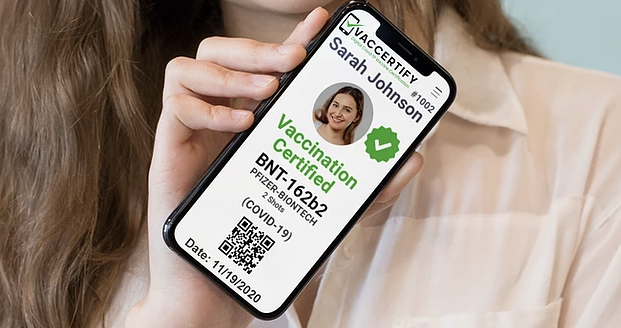
That's when she got the inspiration to create an app that would allow people to share proof of their vaccination certification. Today, Lyons is the founder and CEO of Vaccertify, a Seattle-based start-up that has created a prototype app that is also called Vaccertify. 

Once vaccinations are available, users can create a digital certification by uploading their vaccination record, a government-issued identification document and a selfie photo. Vaccertify then creates a ID screen that includes a scannable QR code linked to a profile in the Vaccertify database. The system also uses a private PIN that must be entered in order to view the certificate.

Like Lyons' babysitter concerns, Vaccertify is designed to be used in social or business interactions. 
For example, a homeowner might want proof that service providers are vaccinated before allowing them access to their home. A party host might want only vaccinated guests at an event. Visitors to a group home could be screened using Vaccertify. And certification could soon become a connection point for online dating.

The cost to use Vaccertify is $49.99 with the certificate posted in seven days. Users can pay more for faster processing.

For a closer look at the service and to find out when it will be available, visit the Vaccertify website and follow @Vaccertify on Twitter.

Saturday, September 12, 2020

App supports workplace misconduct probes

In the wake of the MeToo and Black Lives Matter movements we've heard lots of promises to do better. Businesses, schools and government agencies are saying they want to do a better job of collecting and responding to misconduct complaints such as sexual harassment, discrimination and retaliation.

Some have have even given employees a mobile app that makes filing complains faster, easier and more confidential. The app is called Telli and it was created by Triangle Investigations, a group of lawyers and investigators that specializes in misconduct investigations.


Triangle's founder is Kia Roberts who was a former assistant district attorney in New York and the NFL's first Director of Investigations. At he NFL, it was her job to examine allegations of violations of the league's Personal Conduct Policy. Situations involving sexual harassment, workplace violence and criminal conduct landed on her desk.

The Telli app is available to Triangle's clients to distribute to their employees. Triangle promises to contact a reporting party within 24 hours after a submission is received through the app. Within 72 hours, Triangle provides the client with a framework showing how the investigation will be conducted. 

The Triangle website says the agency "conducts timely, sensitive, comprehensive investigations into allegations of misconduct. Triangle provides a conclusion of findings to the party who made the initial report and also to key organization stakeholders."

In addition to the the misconduct reporting app, Triangle also offers investigations under a long-term contract or on a case-by-case basis. It also provides employee training and human resources consulting service.

For pricing and more details about the Telli app, visit the Triangle website and follow @triangleinv on Twitter.


Saturday, September 5, 2020

SyncGo has a smooth desktop calendar

My son is among the millions of Americans who were recently told to stop coming in to his employer's office and start working from home every day. One of  the many things he has had to adjust to in the new WFH environment is managing his business and personal calendars with their myriad video conference calls and shared domestic responsibilities.

I told him to check out the SyncGo Desktop Calendar. It's a nifty widget that carves out a slice of a Windows to let you know what will soon need your attention and when that will happen. 

The application stays in sync with Google Calendar, Google Tasks or Apple's iCloud calendar and it works with iPhones, iPads and Android devices. If you enter an event from your desktop computer, it gets added to the one on your mobile device. It syncs ion the opposite direction as well. 

You can set the app to deliver pop-up reminders or reminders delivered by email or text messaging. Drill down and you can see events displayed by day, week, month or year in a list format or a color-coded array of sticky notes. And it offers a five-day weather forecast presented with icons (sunny, cloudy, rainy) and high and low temperatures.   

SyncGo Desktop Calendar also plays nice with your desktop wallpaper. The current month's calendar, event list and to-do list appear as an overlay so it doesn't interfere with the sunset beach wallpaper that you're so fond of. And it has a skin editor to customize fonts, colors and backgrounds.

The application sells for $14.95 and you can try it for free for 30 days. For a closer look at the SyncGo Desktop Calendar, visit the SyncGo website


Sunday, August 30, 2020

Affirmations app helps users reach their goals

“Nobody’s perfect,” as my mother would frequently remind me. Then she would add, “But don’t let that stop you from trying.”

Over time, I figured out her point: It’s your life, you are in charge, so why not aim high?

For some people, the task of steering their ship of life seems to come without effort. Others, probably most others, could use a little help. Many people have found that help by establishing a routine of daily affirmations - positive expressions of their goals and beliefs. 

And, yes, there’s an app for that.   

Affirmations is an Android app that helps you set goals and track your progress. Once a day - or more often - the app delivers a reminder of your chosen goal. 

When you’re prompted to remember a goal, adherents say you sharpen your focus and program your subconscious mind to continue your quest. Think of it as a daily planner for your brain. 

Some people already have a special goal in mind, like losing weight or making new friends. Others set up a program by choosing from a list of self-improvement topics such as Happiness, Health, Prosperity and Finding love.

And some folks just need to reaffirm what they already know - that there is love and joy all around them. 

The Affirmations app is available as a free download from the Google Play Store.

Thursday, August 27, 2020

App offers daily Tarot readings

There was a time some years ago when my daughter was trying to decide whether to continue her relationship with her boyfriend or break it off. She went so far as to make a list of her guy's traits, one column for the good one, another for the not so good.

I remember suggesting that she find someone to provide a Tarot card reading. I told her that when I was her age and facing a similar dilemma, the cards didn't give me a direct answer but they did help me help me analyze the situation from different perspectives.

These days anyone with an Android phone or tablet can get a free Tarot reading with the MyTarot app.

The app is designed to provide a daily reading using the Lenormand card deck. What is the Lenormand deck? The app developer explains it this way:
The Lenormand Deck is a collection of 36 cards whose interpretations far outweigh what they may ordinarily infer on a surface approach. These cards wield the power of divination to an extent and one might decide to read them for different reasons, from different viewpoints. 
The Lenormand deck is somewhat different from the deck I used many years ago. According to some descriptions, it contains cards that are classified as positive, negative or neutral. Cards in the deck I remember were more vague and open to interpretations by the dealer. Even the dreaded Hanged Man didn't always signify something terrible.

With the MyTarot app, users can choose among a range of spreads to help understand different situations. Examples of spreads include One Question – One Answer, Pro and Con, Love and Relationships and Decision Help.

To get a closer look at the MyTarot, watch the video below or download the app for free in the Google Play Store.


Saturday, August 22, 2020

App links users to psychic readings

I try to walk the path between being a skeptic and keeping an open mind.

Some years ago, a friend introduced me to Tarot cards. At first, I thought it was a bunch of hooey. But with each reading, I began thinking about different aspects of my life and seeing some of my decisions in a new light.

Maybe that's why people continue to consult with psychics. If they don't exactly predict the future, they might be a useful sounding board when you have a lot on your mind.

So these days, where do you find a professional psychic? On your mobile phone, of course.

The Free Psychic Reading App offers direct contact to more than 100 psychics and life coaches who specialize in a variety of topics. Categories include Love & Relationships, Spiritual Guidance, Mediums, Career Guidance, Psychic Predictions, Mediums, Numerology, Rune readings  and my old favorite, Tarot Readings.

Users get heir first reading for free, delivered online, via chat or by phone.

The Free Psychic Reading App is available as a free download -- with in-app purchases - in the Google Play Store.

Wednesday, May 27, 2020

MyTemply app logs and reports your health

People in Singapore, Taiwan and South Korea have been using digital self-reporting apps that area credited with curbing the spread of Covid-19 in the early stages of the virus outbreak.

The apps allowed government and health authorities to identify and track both people who had a virus infection or symptoms while also tracking anyone they may have come in contact with.

In the US, Apple and Google have announced plans to create a similar tracking system using a mobile phone-based app. While the Apple-Google technology is in its early stages, a private company has released an app called MyTemply that helps track their health status and share it with their school or employer.

With MyTemply, users enter their body temperature using any type of thermometer. They also note other symptoms, such a cough, shortness of breath, headache or chills. Use of the app is voluntary and the data is self-reported. MyTemply doesn't use Bluetooth or GPS and doesn't record or track anyone who comes in contact with the user.

The app is designed to be used every day to report the user's heath to their school, company, hospital, doctor, or family. Managers can get a secure dashboard that collects and organizes the reported data. The information can be shared with some human resources management systems.

The app is available as a free download on the Apple App Store and the Google Play Store. More information is available at the MyTemply website.


Saturday, April 4, 2020

A time for Neverthink

Life in a state of social distance has included a lot of television watching. Like many others, we're following the Tiger King and that woman stranded in 19th Century Scotland. But I've also developed an appreciation for Neverthink.

It's a video channel that's populated by streams of perpetual video clips, most of them from YouTube. According to Neverthink, the clips are selected and curated by humans who look for the interesting or unusual. The videos are sorted into some 20 different topic channels.

In my first encounter with Neverthink, I was first entranced by the Drones channel. It was showing a guy doing a daredevil run across a series of rooftops followed by a drone chasing a roller coaster. I was hooked. Then there was the Dashcam channel where I killed an hour (maybe more) watching bad drivers do stupid things.

Sounds like mindless entertainment? It is, and that's by design. It's for people who don't want to spend time searching for something to watch. Tech Crunch said the channel "might just be the most ‘lean back’ online video experience yet."

Here's how Neverthink co-founder Aviv Junno described his creation: “We believe that the main reason people watch videos online is just because they want some distraction. To clear their mind after a day of work, have something in the background to keep them company, to watch while commuting to work, on the toilet etc. People don’t necessarily want to watch something specific, or want the perfect video. We created Neverthink for those times”.

Neverthink reminded me of Night Flight, a visual arts program that ran on the USA Network in the 1980s. It's where I saw the animated series Aeon Flux and J-Men Forever.

Not every channel on Neverthink is something to play in the background. It's Late Night News channel streams monologues and segments from Colbert, Kimmel, Fallon, Seth Myers, Samantha Bee and Trevor Noah at Comedy Central, which isn't on YouTubeTV, my selected cable alternative. I also like Making Stuff and the photography tips on the Learn Something channel.

You can see the full channel line-up on the Neverthink website. A Neverthink app is available for Android and iOS devices and for Apple TV and Amazon Fire streaming boxes. 

Monday, March 30, 2020

Videoconferencing zooms during quarantine

Over the years, we’ve used FateTime and Duo to connect with family members across the country (and across the street) for one-on-one video conferences. But yesterday was our first Zoom party.

Zoom is a free videoconferencing app that works on the full range of desktop computers, tablets and mobile phones. And, in this time of life under quarantine, it’s taking off like a . . . well, you know.

The New York Times reported that Zoom had recently zoomed to the top of the free download list in Apple’s App Store with downloads reaching almost 600,000 on one day.

Yesterday we used Zoom to join a family gathering of my wife’s four siblings. We are scattered across the country, from Louisville to Detroit to Denver and Chicago and hadn’t been together since our daughter’s wedding six years ago.

For almost an hour, we complained about the coronavirus, got updated on our children and grandchildren, traded tips for staying safe and exchanged a few recipes. It was so enjoyable that we decided to meet this way every Sunday afternoon.

FaceTime and Duo both support group session, but I found Zoom to be both easier and more enjoyable. The audio was good and consistent and the video images were sharp and crisp for those of us who had light on their faces. The app highlights the person who is speaking, making it easy to follow the conversation.     

One Zoom feature that I really liked is the option to change backgrounds without a green screen behind you. You just upload a photo from your collection and you’re instantly chatting from a cafe in Paris or a ski resort in Aspen. The Times said one college student posted a looping video of a male stripper as his background.

For our family chat two of us chose photos of places we would rather be. One of my in-laws appears in a view from his lakeside cottage while I chose a sunset shot on a Florida beach.

Sunday, March 22, 2020

Twisted 23 reimagines classic slider game

I called him Uncle Al, but he wasn't really my uncle, just a friend of my parents. As a 7-year-old kid, I thought Al had the coolest job in the world. He owned string of gumball vending machines and always had loads toy prizes and tchotchkes.

One of my favorites was the slider puzzle. It held 15 numbered squares in a plastic frame. Players would slide the pieces around the frame and use the lone open square to rearrange them into numeric order.

I was reminded of Uncle Al and the sliding puzzle game when I came across Twisted 23. It's also a sliding number puzzle but recreated for playing on an iPhone or iPad.

Early slider puzzle.
Twisted 23 expands the old slider concept. It has a larger game board with 24 slots and 23 tiles. Then it tilts the board on its side to present a diagonal playing field. It also adds a couple of other enhancements.

A game starts with numbers arranged in a specific order. When the player taps the "Shuffle" button, the tiles reappear in a new order and a play clock starts ticking.

The goal it to arrange the board in its original order with the fewest moves or fastest time, then compare your score with others on a leader board. The app also has an optional  4 x 6 puzzle that's similar to the conventional 15 square slider puzzles.

Twisted 23 is available to download from the iTunes App Store. The app is free, with ads, or you can remove the ads for $.99.


Friday, December 20, 2019

Duel Quiz is a fantasy app for global soccer fans

As the NFL football season rolls toward the playoffs and the Super Bowl, millions of Americans are checking their mobile phones for updates on their favorite teams and fantasy league players.

But in much of the rest of the world, fans are following a different sport, the one Americans call soccer. And those fans also have a mobile app and a fantasy game they can play.

Football Duel Quiz is a turn based multiplayer trivia game for all designed for soccer fans around the world. Users play as a member of their favorite club and they compete against other club fans. Points are scored in during six round of trivia questions.

To score points, players answer questions like this one: "Who was the first man to bring any major silverware for the Manchester United?" With each win, points are contributed to the player's chosen team. Like a real life football league, the game has clubs standings for each league, with rankings determined based on their fans' contributed points. And as in real club soccer, after each  season, the top two clubs are promoted to a higher football league while the bottom are relegated to a lower league.

The game includes the top 64 football clubs from around the world in three football leagues. The developers say more clubs will be added in the future.

Football Duel Quiz is available as a free download in the Google Play Store

Sunday, September 1, 2019

Free app lets Amazon vendors estimate monthly sales


For every product listed for sale on the Amazon website, there’s a number that can be a key element in the product’s success. It’s called the Best Sellers Rank and it tells buyers and sellers how popular a particular item is in its product category.

At this writing, the iRobot Roomba 960 Vacuum Cleaner is ranked No. 1,170 in the Home & Kitchen category.

A product’s ranking is a good thing to know if you’re among the more than 2 million active Amazon sellers. An even better number to know would be an estimate of how many products a vendor might sell each month. Now a new app called SPM - Sales Rank Analyzer puts that number at a seller’s fingertips.

SPM is a specialized calculator that takes a product's Amazon sales ranking and determines its estimated monthly sales.

If you wanted to be one of the Amazon vendors who sell the Roomba 960,  putting that 1,170 ranking number into the app would give you an estimate of 3,900 in product SPM -- sales per month. SPM Analyzer will calculate the amount of units you can sell of that product and how much stock you should send to Amazon's fulfillment centers or to your own warehouse on a monthly basis.

Websites such as AMZ Scout or Jungle Scout provide a similar service through their site, sometimes for a fee. SPM Analyzer is free and it's currently the only mobile app that offers SPM data on an iPhone or other iOS device.

The app covers rankings in all 30 Amazon product categories and it lets users calculate sales for specific geographic markets such as Canada, Germany or Great Britain as well as the U.S.

For a closer look at SPM - Sales Rank Analyzer, check out the video below and the preview on the Apple App Store.


Tuesday, July 23, 2019

App creates augmented reality objects

The arrival of Pokémon GO in 2016 not only got people out of their home to search for digital creatures, it also introduced average folks to the mysterious world of augmented reality.  Suddenly they could see a Pidgey hopping around the shopping mall and a swarm of Zubats gathered on the library steps.

Now a new iOS app could expand the AR world even more by making it easy to create and share augmented reality objects.

Advncd AR allows users to create their own custom augmented reality objects using their own photos. It eliminates the need to comb the Internet looking for collections of AR objects to download and deploy.

With Advncd AR, users select an object that they would like to create, then upload photos and text to the app.

The app comes with libraries stocked with animations and simple screens. The app currently has six models and use cases to choose from and the developers indicate more could be added in the future. 

When the object is in place, the app generates a QR that to share with friends and associates. when they scan the code, they will see the objects you created.

Advncd AR is available as a free download in the iTunes App Store.

To get a closer look at the app, check out the video below and visit the Advncd AR website.


Tuesday, April 23, 2019

App guides you to a perfect day

I believe that most people have the knowledge to create the type of life they want, they just don't have the perseverance to pursue their goals.

There are too many distractions in our daily lives. Dealing with work, family, children, money and other daily issues issues sap or energy and attention, leaving little time to devote to the thoughts and practices that bring us peace and happiness. Me time just boils down to sleep time.

A new app called My Perfect Day is designed to help us fallible human focus on things that are important to us while finding a measure of daily happiness.

The app is divided into four primary elements: Journaling, Breathing, Habits and Affirmations.

Journaling gets users' attention every morning and evening and guides them through a set of questions that focus on the things in their lives that bring them the highest level of happiness and overall fulfillment.

Breathing and Habits sections prompt users to pursue activities that contribute to their physical and emotional well being. Proper breathing routines can keep our bodies infused with fresh oxygen while Habits remind users to exercise, talk with partners or maintain an active social life.

And Affirmations deliver words of encouragement that keep users moving along their chosen path. Here's an example:

I am the architect of my life; I build its foundation and choose its contents.

The My Perfect Day app is scheduled to be released on May 1. The initial version will be for iPhones and other iOS devices. To get a closer look at the app, check the video below and visit the App Store preview.

Website has tips for app makers

If there's any doubt that we are rapidly moving into a fully mobile world, the latest Internet traffic statistics should put that to rest.

According to one report, more than 52 percent of worldwide website traffic in 2018 came from mobile phones. That's up from less than 44 present just two years earlier.

With mobile apps contributing a substantial amount of that traffic, it's little wider that businesses and organizations that were content to provide a simple website just a few years ago are now expanding to offer a dedicated mobile app.

Create.app is a website that offers a variety of free and useful tips and suggestions for anyone considering building their own app.

In one section, the site provides a step by step tutorial for using Mobincube, a software package that promises to create a simple app in as little as 20 minutes. For people who don't have professional programming experience, there's another section that looks at services such as Fiverr and Upwork that will connect potential clients to professional programmers.

For people who have a mobile app, Create.app offers tips for using social media and other channels to promote the app and increase visibility.

For more details and to read all of the tips and ideas, visit the Create.app website.    

Feature Posts

Twitter


© 2013- GizmoEditor.com. All rights resevered. Designed by Templateism Templateism

Back To Top