If your daily routine is like mine, it includes these three things: 1) read a news story on the Internet, 2)share a link to the story it with someone you know, and 3) discuss the story with a friend family member.
I use a browser, text messenger and other apps to do all that but now I've discovered a new app called Weblink that lets me do all of those activities in one place.
Weblink users start by selecting their global area of interest, such as America, Africa, Europe or Middle East.
Then they browse summary streams of news stories from a variety of sources including broadcast networks (CBS, Fox, ESPN), newspapers and magazines (Rolling Stone, Wired, The New York Times) as well as special interest blogs like Gizmodo and the Daily Caller.
Pressing a refresh button moves you from one stream source to another. You can also use a search window to bring up links to articles on your search topic from a mix of sources.
See a story you want to read or share? One click opens a menu to let you read or share the article.
The app also lets you bookmark a story or video and view or start a chat session or discussion thread with other users who might have opinions on the article. The Weblink developers say chats and discussion posts are encrypted.
Weblink currently runs only on Android devices that have version 8.0 or later of the operating system. The app is free, with advertising, and can be downloaded in the Google Play Store.
I have two adult children who both thumb their noses at Apple products in general and the Apple Watch in particular. They are all in with Android phones and Android watches.
One big reason why they favor Android is Andros give them much more control over their devices than the other guys. They especially like to personalize their watch faces.
That’s why I told them about Live The Times. It’s a development house that offers more than 30 faces for watches that run Wear OS. And a lot of them are pretty slick.
The Courser face caught my attention. It offers multiple complications such as moving bezels and an analog and digital stopwatch. , and custom complications. The bezels rotate and work with the analog hands to add functionality.
The Executive Gold Earth shows some serious style and the Cyber Red Tech tells time down to the second, for someone who wants to make every second on this planet count.
The most popular face in the collection is the Flames watch face. It has a detailed fire animation and complications such as weather updates and heart rate sensor support.
Live The Times faces support a variety of Android watches including models mad by LG, Asus and Fossil along with fashion brands such as Michael Kors, Louis Vuitton, Kate Spade and Emporio Armani. To see the full collection, visit the Live The Times website and companion store on Google Play.
There was a time when I always carried a pen and few scraps of paper. I wanted to be ready to jot down a phone number, a reminder, an appointment or something to add to my shopping list.
Of course those days are gone now that everybody carries a computer -- their mobile phone -- in their pocket or purse. And those phones offer several apps to capture notes or reminders. But so far, I haven't found one specific app that will quickly and efficiently capture and file every piece of data.
JotBlue just might be the one. It's a recently upgraded app for Android phones that can handle and manage a wide variety of information bits. For instance, you can type in text or activate the phone's microphone to dictate a note or appointment.
And it solves a problem I've had with Evernote, one of the most widely used apps for capturing and storing notes. When I want to take a note with Evernote, I have to find the topic I want it to be stored under, otherwise it just becomes a generic catchall memo.
JotBlue uses a clever letter code to tag a note right from the start and direct it to the proper folder. The letters correspond to topics: A = Appointment, B = Buy, C = Call and so on.
Need a reminder to buy a gift card for your brother? Type B, then a space, then "gift card for Pete." Type a D to make an entry in your diary or E to record a business expense.
Here's one more feature that I like about JotBlue: You don't have to give up Evernote. If you sync Jotblue with Evernote, all of your Jotblue notes will also be recorded in your Evernote App.
JotBlue is available as a free download in the Google Play Store. For more details, check out the video below and visit the JotBlue website. JotBlue is also on Facebook and @jotblue on Twitter.
I paid a lot of money for my new phone, partly because it came with a fast processor and plenty of data storage. But I can't tell tell you how fast my CPU is running or how much of that storage is being used at any given time.
Well, I could look it up, but that would require a lot of poking around to find the right reporting tool.
What I would prefer is a single app that would calculate and report all of the important metrics that impact my phone's performance and make that information easily accessible.
Android users can install an app that does just that. It's called CPU Information. It gathers performance data from every corner of your phone and arranges all of the available reports in ring of icons. Think of it as the one ring to rule them all.
Touch the CPU icon and you get details on the chip's architecture, usage stats and clock measurements. The RAM report tells you about memory demand, buffers and cache while the storage report calculates the size and available space on internal drives and memory cards.
Other reports look at the phone's display screen, camera, graphics processor, SIM card, Wifi connection and battery. It will even tell you how much power is being used by the phone's accelerometer and magnetometer. And the developers say more features will be added in the coming months.
The app is available as a free download in the Google Play Store.
For a closer look at CPU Information, check out the video below and visit the Parallel Axion website.
Considering how much we love our mobile phones, you’d think we would take better care of them. One report I found said 3 million Americans lose their phones in a year’s time and 2 million more have their phones stolen. The numbers were higher in many other countries.
New phone-tracking apps are helping reduce phone losses, but no app that I’ve encountered takes tracking, security and recovery farther than miFon does for Androids. Developed by a group of Indian professionals working in the UAE, miFon is a collection of utilities and mini-applications designed to keep your Android phone secure, healthy and in your possession.
An example of the miFon features is an option called miVac that scans all of the apps installed on your phone looking for evidence of viruses, malware or other malicious code. Another called xFit weeds out unused and extraneous files to keep the phone working smoothly.
The app will automatically run backups on your contacts and media files and it places an SOS button on the miFon home screen so a user in danger can discreetly send a message to a trusted phone number. That’s four very useful programs, each of which typically requires a separate app, that miFon has packaged under one umbrella.
But I installed miFon because I was especially interested in the security and tracking features that it offers. Like other tracking apps, it located my phone as soon as I installed the program and it tags that location, with a timestamp, on a Google map on the miFon home screen.
I wanted to see what tools I could use if I left my phone on a park bench, in the back seat of an Uber, or if it got stolen. I logged into my account on the miFon website and used the miFon Genie to get its “last seen” location with GPS coordinates, directions from my location, and the option to see a satellite view.
Now, let’s say someone is messing with the phone. Using the Genie, I activated the seeKie feature, which caused the access screen on my phone to go black and display a stern notice: “This is a LOST PHONE” with a phone number to call to “contact the rightful owner.” That’s not exactly accusing anyone of stealing the phone, but they’ll get the picture.
And if you want add some extra punch to that notice, you can deliver it with an accompanying siren. I tried that feature and it spooked the dogs and startled my wife, who was two rooms away from me. It will thoroughly get their attention.
miFon has other weapons in its security arsenal. The Genie will let you remotely change your screen lock code, for example. And a feature called thEfie will snap a photo of someone while they are trying to get past your lock screen. When I entered a few random numbers, thEfie silently activated the phone’s front-facing camera, snapped a photo, and immediately emailed it to me along with a location map. I was impressed by that trick, though not by my unexpected selfie.
All of the tools offered in the miFon app are listed on the miFon website and on the app’s download page in the Google Play Store. The listings are short on details and I had to learn the program using more experimentation and trial and error than I would have liked. But once I got comfortable with miFon, I was convinced that it would be a valuable addition to any Android phone.
Users who download the app for free can use the app’s advanced features such as thEfie for 30 days and can keep them after that period by paying an annual subscription fee.
Viruses and malware typically target desktop or laptop computers, but because we often use the same web browser on our mobile devices, they can also be at risk.
That’s why we’re seeing an increase in security apps created for mobile operating systems like Android and iOS.
An Android app called Phone Security: Antivirus & Clean wraps a variety of useful utility programs into one protective app. The key feature is an antivirus scanner that uses a cloud-based engine to scour the phone for the latest and most common threats.
The app also includes a feature that improves the phone’s memory by deleting background applications; a PhotoVault, which stores selected images in a password-protected location; and AppLock, which hides apps that you don’t want colleagues or family members to see.
The app also includes a stealth browsing mode and a battery monitor.
Phone Security: Antivirus & Clean is available and a free, ad-supported app in the Google Play Store.
While browsing the all-ages mobile games in the Google Play Store, you may see more than one game called Bubble Shooter. Those aren’t duplicates of the same game, they are different twists on a popular formula.
And while you may have already rescued imprisoned lambs and kittens in other bubble-shooting games, there are still some cute squirrels who need your expertise.
Like some other bubble-shooting games, this one challenges players to pop three or more bubbles of the same color in order to release the squirrels and move on to a new level.
The game has more than 100 levels and players have unlimited lives so they can play whenever they like and for as long as they choose.
As the popularity of bubble shooter games continues to grow, developers keep coming up with new scenarios to extend the franchise.
Bubble Shooter, which was recently updated by 3DGames, challenges players to rescue cuddly sheep that are trapped inside bubbles. The only way to release them is to shoot and match sets of similar bubbles.
The game offers about 200 different levels and puzzles along with a variety of different maps and bubble styles. Players will encounter a fire bubble, a bomb bubble and other variations.
Play modes are simple and easy to grasp for players of all ages. Just shoot three matching bubbles to advance.
Bubble Shooter is available as a free download in the Google Play Store.
How do you rescue cute kittens from the clutches of an evil monster? Fire up your bubble shooter and start taking aim.
That’s the premise behind Puzzle Bubble Shooter Classic, a new arrival in the popular genre of mobile bubble shooters.
The Android game offers more than 300 different levels in four play modes.
Players pop colored bubbles by dragging or tapping their bubble blaster and aiming at descending rows of colored bubbles. When you have a bubble in your sights, release your finger to fire the shooter.
Match three balls or more of the same color to score. Combos and boosters that include a rainbow, fire, lava and a friendly provide super aiming to help conquer each challenge.
Puzzle Bubble Shooter Classic is free to download in the Google Play Store and can be played offline without an Internet connection. The game include some optional in-game items to purchase.
For a closer look, check out the video below. You can also follow Viet Game Studio @nghichthienta on Twitter.
What’s the most useful app on a mobile phone? I’m betting that a lot of people who vote for the flashlight app.
Think about how many time it’s helped you find your keys or the money under your car seat. The last time my phone flashlight came in handy was when I was searching for a cat in a closet.
Flashlight apps like the Super Flashlight for Android phones use the light that was initially included to assist the phone’s camera. And those lights have gotten brighter and stronger as new phone models are released.
Super Flashlight says its light has the fastest startup time and “the brightest illuminator ever.” The app includes a strobe mode with a frequency controller and an option to flash an SOS signal.
Super Flashlight is available as a free download in the Google Play Store.
When my father taught me to play Solitaire, his version used a three-card draw. Players draw three cards at a time from the stack of 24 cards that are not already on the table. After playing all 24, they can turn over the stack and keep going until all plays are exhausted.
It was much later that I heard about a casino version in which players draw one card at a time and get only one trip through the stack of 24. A typical bet would be $50 with a payoff of $5 for each card moved to the foundation piles.
I’ve never seen Solitaire played in an actual casino, but apps like the free Solitaire card game created by CardGames Studio let players choose in either Draw 3 Mode or Vegas Mode.
This versions of Solitaire is a lot like the free game that came with early versions of Windows but with several options. For example, players can choose among 10 different table styles, four card face styles and 12 card back designs. Mixing up the display keeps the game interesting.
Other options include unlimited use of the Undo button, hints to show the next move and an autocomplete option to finish a solved game. The app tracks your personal records and offers a daily challenge.
Free Solitaire is built for Android devices and is available to download from the Google Play Store.
Heading out of the country for the holidays? You can get a quick weather summary for just about anywhere with the 5-Day Weather Forecast app.
The Android app displays the latest temperatures and conditions, with the high and low forecast, for more than 1,300 locations around the world. It lets you know at a glance if it’s sunny or soggy in Singapore or Sao Paulo.
The free version of the app supports two locations and updates weather conditions every 12 hours. A premium version shows conditions at five locations. It will update the forecast when the app is launched, then every hour afterwords.
The 5-Day Weather Forecast app is available as a free download for Android devices in the Google Play Store.
When the lottery came to my state several years ago, I joined a pool created by people in our office to buy tickets every week. Finding players was not a problem, but we never came up with a good system for picking numbers.
Someone in our group suggested that we might eliminate numbers that had been drawn recently or repeatedly in the past few weeks. That sounded like a great idea, but no one wanted to take the time to track the draws and chart the numbers.
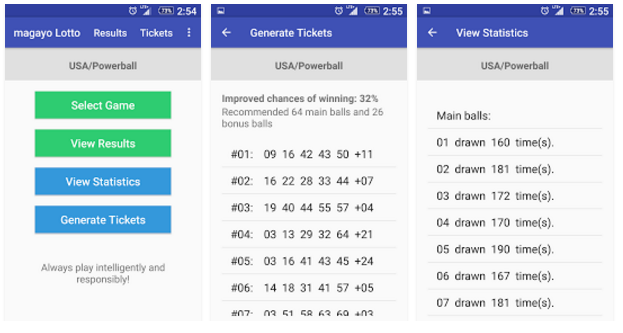
Today that’s an easy task for anyone using a lottery app like Magayo Lotto. The app is an easy-to-use lottery number generator that works with more than 250 lottery games in over 70 countries.
In addition to state-based lotteries and the PowerBall Lottery in the US, the app lineup includes Euromillions, Eurojackpot, Thunderball, SuperEnalotto, Mega Sena, Melate and Megabola, among others.
With Mayago Lotto, users can view lottery results and the frequencies of the balls drawn. It will also generate suggested numbers for different lotteries.
For more dedicated players, Mayago Lotto offers a statistical analysis program for Windows desktop or laptop computers.
The app version is available for Android devices as a free download, with no ads, in the Google Play Store. For more details on the desktop version, visit the Mayago website.
The world of mobile video games is dominated by shooters, combat simulations and other games that generally appeal to boys and young men. But recently we’ve seen more games that appeal to young girls.
A good example is a makeup game called Makeup Spaholic Hair Salon. It's a mobile game that simulates the challenges of running a salon that features modern designs for hair, nails and makeup.
The game offers players the chance to experiment with a variety of hair styles, makeup and more than 3,000 designs for artistic nail treatments.
When customers arrive, players start by helping them choose a new hair style. If the customer is pleased, you get paid and tipped in coins. Your skill levels increase as you collect more coins and more options are unlocked.
The makeup area becomes available only after players improve their skills with successful hair and nail treatment.
Makeup Spaholic Hair Salon looks like the perfect game to keep a pre-teen girl occupied. It’s available as a free download for Android devices in the Google Play Store.
In our family, we call our daughter the Weather Girl. She has so many weather apps on her phone she could be doing reports for the local TV stations. If I ever need to know the dew point or when the moon will rise, she's the go-to gal.
But my daily weather information needs are not very complicated. I like to know the current temperature and the predicted conditions for later in the day and what I should expect for the rest of the week. On my Android phone, the aptly-named Little Weather App fills that need nicely.
When I open the app, I see my location and current temperature displayed in a nicely-drawn streetscape graphic that changes with weather. The little town is a lot like life: Sometimes you get a big yellow sun, sometimes you get dark clouds and raindrops.
The scene can also be used as a face for an Android Watch, adding the current temperature and conditions to the time and date.
As you scroll down the display on a phone or tablet, the app offers more details, including the “feels like” temperature, humidity level, air pressure, wind speed and direction and the precipitation chances.
A chart shows readings from the past 24 hours for temperature, windspeed and precipitation, depending on which button you press.
I usually bypass that stuff and go directly to the hourly forecast. I want to know how much I will sweat if I plan to play tennis at 2 p.m. or whether the predicted rain will hold off until after my evening dog walk.
The Little Weather App shows predicted temps for each hour and a graphic to indicate if it I should expect rain or just cloudy skies. The weekly forecast is displayed in similar fashion with the predicted high and low temperature and conditions.
The app uses data from Forecast.io, which aggregates data from more than a dozen sources, NOAA’s forecasts in the US and METAR forecasts used by pilots around the world.
The Little Weather App is a free app, so you can expect to see a small add on most pages. It’s available for Android devices in the Google Play Store.
The app’s developer, John Carpenter, has a portfolio of his other Android projects on his 2Lines Software website and you can follow him @johncarpenter on Twitter.
When it comes to my son and me, we are a family divided. While I’ll be tuning in to watch the Colts this weekend, he’ll be at the Chargers game in San Diego. More importantly, while I’m all in with Apple’s mobile devices, he’s all things Android.
But we both like to keep up with any news from the mobile world and that’s why I know we’ll both like Mobile News Flash, a website that tracks the latest news, reviews and product deals from the world of Android, Apple, Blackberry and Microsoft phones.
The site mixes feed of real time news from more than 100 sources that include well-known names such as Cult of Mac, Droid Life, Android Authority, Windows Central, CNet and Mobile World Live. Each report includes the headline and a summary.
Click the headline to read the full story on the originating site or check the Sources button to get a summary of all articles from a selected sources sorted by date. Readers can also drill down to find news tagged by topics such as iPod, Nexus, Samsung or Huawei.
Other options reveal price cuts and other deals of posts from Freelancer.com and other sources that list job openings in the mobile technology industry.
As someone who has been spending a lot of time recently entertaining grandchildren, I’ve discovered two things that are guaranteed to make them smile: cute little animals and bubbles.
And there is plenty of both in Monster Pet Pop, a bubble shooter game that in which you are recruited to help Stella and her little dragon battle a gang of monsters.
The game’s central challenge is to pop bubble by shooting them and trying to match three or more of the same color. If you’re successful, you’ll collect stars and free the pets and ghosts that are trapped inside their own bubbles - and you will be true to the Bubble Legend.
The game has different challenges spread across 150 different levels, each with different graphics and new puzzles. Along the way, you can collect boosters, combos and other rewards that will improve your shooting skills.
Monster Pet Pop is available as a free download in the Google Play Store. It’s rated E for Everyone and it include some in-game purchase options.
For a closer look at the game, watch the video below.
I’m often driving my car when something pops into my brain that I want to write down and remember. It might be food that I need to pick up at the grocery store or an item I sometimes forget to pack for a business trip.
I’m not going to pull over or type on my phone while driving so I might dictate a text message to myself.
Notibuyer looks like a much better alternative. It’s an app that lets you dictate a voice memo and have it automatically transcribed.
Each voice memo recorded with Notibuyer is transcribed into text and also saved as an audio file. If you’ve used Google Voice to transcribe phone messages, you know that transcription is not always 100% accurate and that it’s a good idea to be able to listen to the original.
Notibuyer will work with photos, too. That can be handy when you remember a specific product or technical details like the formula for custom-mixed paint or the prescription you got at your last eye exam.
Users can also invite friends, family members and business colleagues to join Notibuyer groups and share notes and to-do lists.
Notibuyer is a free download for Android devices available in the Google Play Store. For more details, check out the video below and visit the Notibuyer website.
A few years ago, I was traveling with the family and passing through an unfamiliar city. It was dinner time and everyone was hungry, butyl of the obvious choices were the typical fast food joints. It was only by luck that we found a family-run Italian restaurant tucked away in a strip mall.
We could have used Spooned. It’s a new Android app that helps you find nearby restaurants or places to eat in another location if you’re making plans for a future future trip or meal.
Each restaurant is presented in a card motif. Like the browsing system used by some dating apps, you can discover and explore new restaurants by "spooning" right or "knifing" left on the cards of each restaurant.
Tapping on a card reveals more information about each restaurant, including their location, hours, and contact information and ratings entered by patrons and Spooned users. You can also look see photos and read reviews, go back to previously spooned restaurants, view a map of all the spooned restaurants in an area and recommend a favorite on Facebook.
Who loves to look at beautiful women in swimsuits? Apparently a lot of people, especially those who have a Y chromosome. Back in the 1970s, a poster of Farrah Fawcett wearing a red swimsuit was a staple of every young man’s room and is said to be the best-selling poster of all time.
Once Microsoft Windows arrived, women in bikinis quickly found homes as wallpaper on on computer screens. Today bikini wallpaper is a popular background on mobile phones.
A free app called Sexy Bikini Model Wallpaper HD brings the practice to Android devices. The app features a changing collection of models posing in a variety of bikinis styles including the string bikini, monokini, microkini, mankini, sling bikini, and Skirtini. None of the models are nude or topless and all images adhere to the Google Play guidelines.
The app automatically sizes images to fit the display size of its host device and users will get push notifications when new images are available.
Users can download a store any of the images and the latest version of the app supports sharing sexy bikini images using Instagram, Skype, MMS, Twitter, DropBox, Google+, Snapchat, and via email.
For more information, check out Sexy Bikini Model Wallpaper HD in the Google Play Store.
I started reporting on gadgets and gear when Atari ruled electronic games and computers used floppy disks. My weekly column ran in the The Louisville Courier-Journal and online at USAToday.com and ABC News.com. I was a regular at tech trade shows including COMDEX, CES and the CEDIA show for home theater. Follow @GizmoEditor on Twitter and on Facebook. Contact me at ricman@iglou.comI also create short videos for vendors to use on Amazon and YouTube. Click here to see a portfolio of my recent videos.
Video by Gizmo
Need a video to promote your app or product? Check out my gig at Fiverr.com and browse my video portfolio here.




 Posts
Posts


