Showing posts with label Microsoft. Show all posts

Friday, June 12, 2020

Navo builds an online company directory

A few years ago when I was still a manager working for a global publishing company, I had a pretty good handle on where to go when I had a question about company policies and practices.

For instance, the administrative assistant on the fourth floor knew all the details about filing expense reports. People in the first floor Human Relations office could answer payroll questions and tell me how to do employee performance reviews.

I don’t know where the people who still work there go to answer those questions today, but I know it’s not to the elevator. These days, almost everyone in that company is working at home and companies are finding new ways to deliver information that managers and staff used to get through in-person conversations.

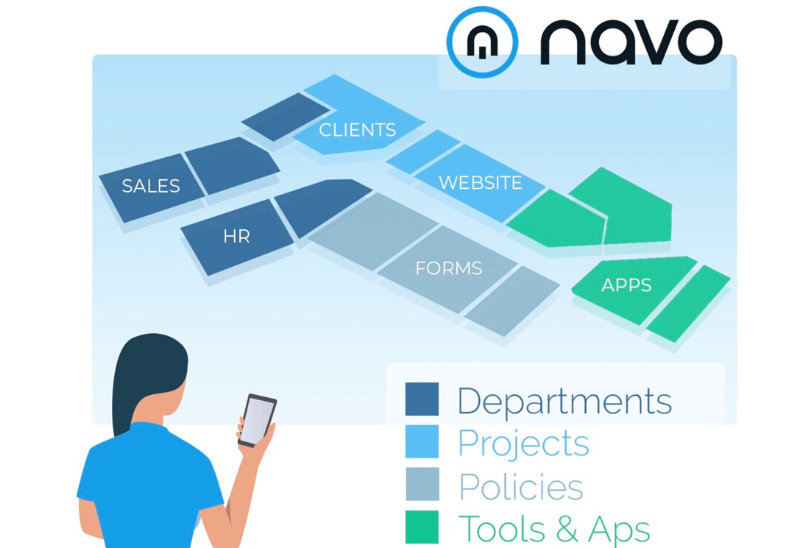
One of those ways is an online platform called Navo. It’s an Internet-based service that lets organizations organize and distribute a directory for their business and make it available to any of its stakeholders - including all those folks who are now working from their home office.

The people behind Navo compare their cloud-based service to the map kiosks that you see in a shopping mall. The map tells you where you are and how to get to what you need.

Destinations are grouped under the topics you would find in most businesses, from Sales, Marketing and Business Development to IT, Finance and Human Resources.

The service is designed to work smoothly with multiple platforms, including Microsoft Teams, Office 365 and SharePoint. There's a registration form on the Navo website to get updates and announcements.

 Information collections can also be accessed using a Web app or a browser extension. If a user bookmarks a critical piece of information, like a vendor contract, it’s accessible wherever and whenever they log in. Navo is also planning

Under a new pricing plan, the charge for Navo will be $1 per user per month. A free trial is available on the Navo website.

Tuesday, November 3, 2015

Free software creates HTML5 videos

Gizmo Editor Review: 

Now that there are grandchildren in my life, I’m spending more time shooting, editing and publishing video. With family members in six states asking for more videos, I’ve created a website for posting and sharing clips and my blockbusters.

YouTube, of course, will store the videos and provide code for embedding a player on a web page. But I’ve also found an interesting alternative that doesn’t require me to surrender my content. Easy HTML5 Video is a free processing utility that will convert video from any common format into HTML5.

What’s HTML5? It’s a recently-developed markup language (the fifth version of the HTML standard) that plays video on a variety of platforms (desktop, mobile, tablet etc.) and works with all of the most widely-used browsers. Have you ever tried to play a video and been told you need a codec or a different player or a newer version of Flash? HTML5 avoids all that nonsense.

With HTML5, you don’t have to upload your clips and movies to some third-party resource like YouTube. The video stays on your server where it can be easily updated and where you control who gets to see it.

And, as its name proclaims, Easy HTML5 Video could hardly be easier to use. I downloaded and installed the Mac version from the Easy HTML5 Video website, which asked for my email address but did not require registration or any personal information.

Once launched, the software presents a drag-and-drop window where I deposited an MP4 video that I had created in iMovie using video from a Periscope session on my iPhone. The program starts by asking you to select a poster image. You can select a frame from the video or upload a separate image.

Next, you select compatibility options for the output file. Do you want Ogg, WebM and low-res MP4? Just click those icons. Don’t care about Flash? Leave it unchecked. You can also change resolution quality in steps from 240p up to 4K.

Converting my 2-minute video took less than 10 minutes and I couldn’t see any loss of quality in the converted version. Once the process is finished, the program offers to export your new video to a local folder or to an FTP directory. It also provides a code block for inserting the video, with player controls, directly into an HTML page.

The Easy HTML5 Video website has more details and free versions of the software for Windows or Mac.  With the free version, there are no limits to the number of conversions you can make for non-profit use, but it does apply a watermark to the converted video. There’s a commercial version for $69 and an enterprise version is $99.

Friday, March 6, 2015

Lookeen makes Outlook search what it should be

When I worked for a Fortune 500 corporation, all employees used Microsoft Outlook for their email client. Outlook is the de facto standard for companies large and small.

But if it's so great, why did we get regular alerts telling us to delete old mail because the mail server was running out of storage space? And why didn't we have a better Outlook search tool than Outlook's own sluggish search window to find mail worth keeping?

You'd think a big company like that would have heard about Lookeen, a highly-regarded Outlook add-in that provides fast and intelligent searches across an enterprise. The program gives Outlook users a toolbar and new window that quickly searches mail, contacts and appointments and shows you the contents of any found item that you click.

Lookeen focuses on Outlook mail, but it's smart enough to also look on your desktop, in your Outlook archives and in folders such as My Documents to find related information on the user's computer and on network file servers. And get this: it's search supports Boolean and proximity searches. That means you can use AND and NOT operators to frame your searches and find documents where one term is near another.

Lookeen has editions for standard and virtual desktops and for enterprise installations. The latest version of Lookeen lets users edit and save documents, including Word and Excel files, from within their desktop search tool. Lookeen also works with older versions of Outlook, including 2003. That would please the people at my former employer where we never had the newest versions of anything.

For more details and pricing, visit the Lookeen website.

Feature Posts

Twitter


© 2013- GizmoEditor.com. All rights resevered. Designed by Templateism Templateism

Back To Top